



Every change, on the record.
Pealboard is a second window onto GitHub Issues and Projects for the people who are not on GitHub, and a portal for the customers who are not on anything. Nothing is copied. If you leave, nothing is lost.
Free for 3 members, 1 portal and 3 repositories. No card. Portal customers are always free.
Why teams pick Pealboard
Your work stays in GitHub. Always.
Pealboard doesn’t copy your issues into its own database. Every issue, comment, label, milestone and project field lives in GitHub, where it always has. If you ever leave, there’s nothing to export and nothing to migrate.
No other work-management tool we researched works this way.
Engineers stay in GitHub, and they’re free.
You pay only for the people who sign into Pealboard: product, support and business staff. Engineers keep working in GitHub as they always have. They never sign in, and they’re never on the bill.
Every other tool we researched charges a seat for every engineer.
Customers can send requests without a GitHub account.
A portal gives customers, partners and staff a simple place to send a request, check its status and reply. Behind the scenes, each request is a GitHub issue in the repository you chose. Your customers never see GitHub.
No other tool we found, including GitHub itself, lets someone without a GitHub account send or follow a request.
How it works
Four steps. Most teams are up and running in an afternoon.
Connect GitHub
Install the Pealboard GitHub App and pick the repositories you want. Pealboard reads the issues, comments, labels, milestones and projects already there. Nothing is copied and nothing changes.
See everything in one place
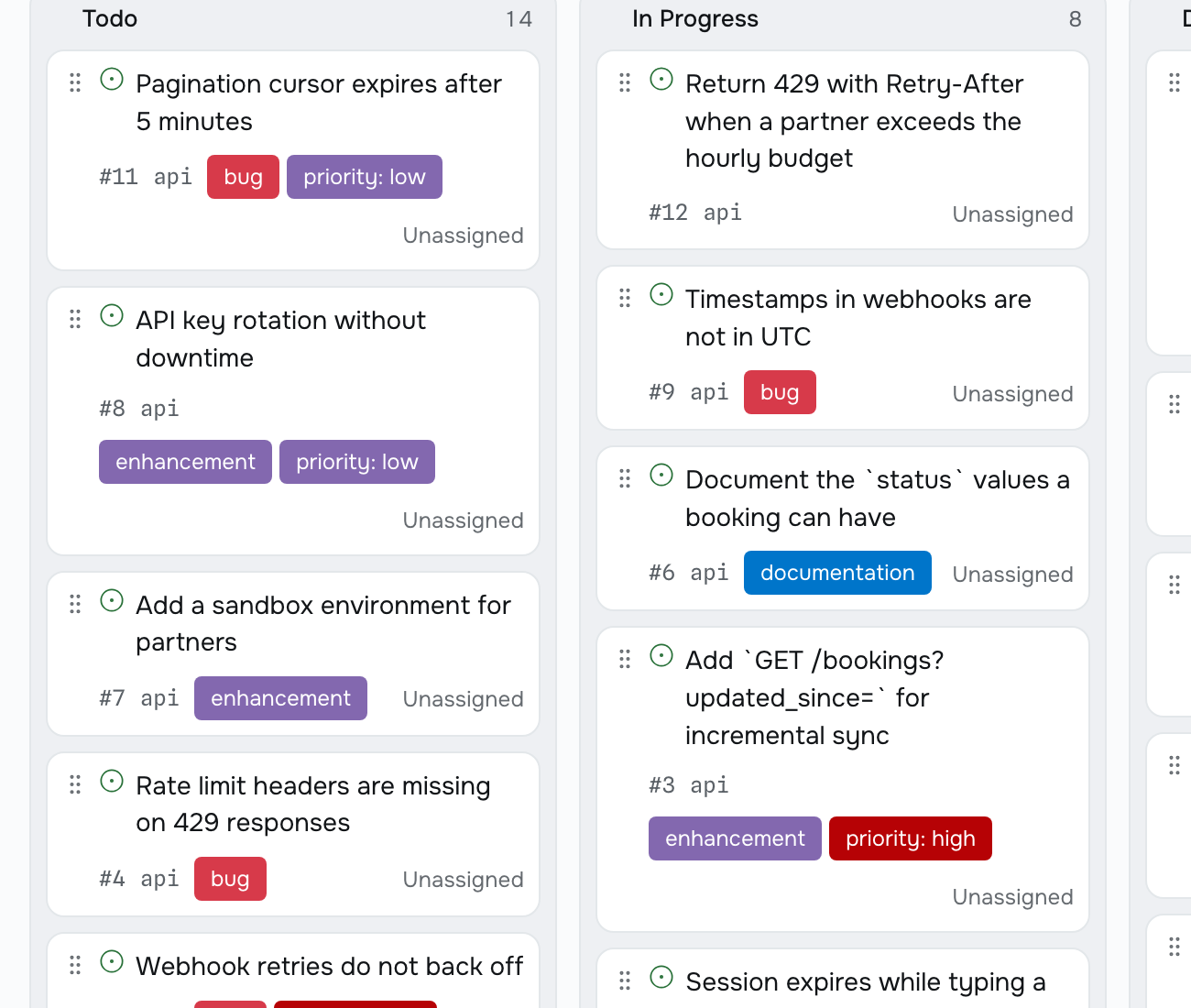
One list, board or table across every repository. Group by status, label, assignee or milestone. Filter it, sort it, and save it as a view your team can open.
Set up a portal
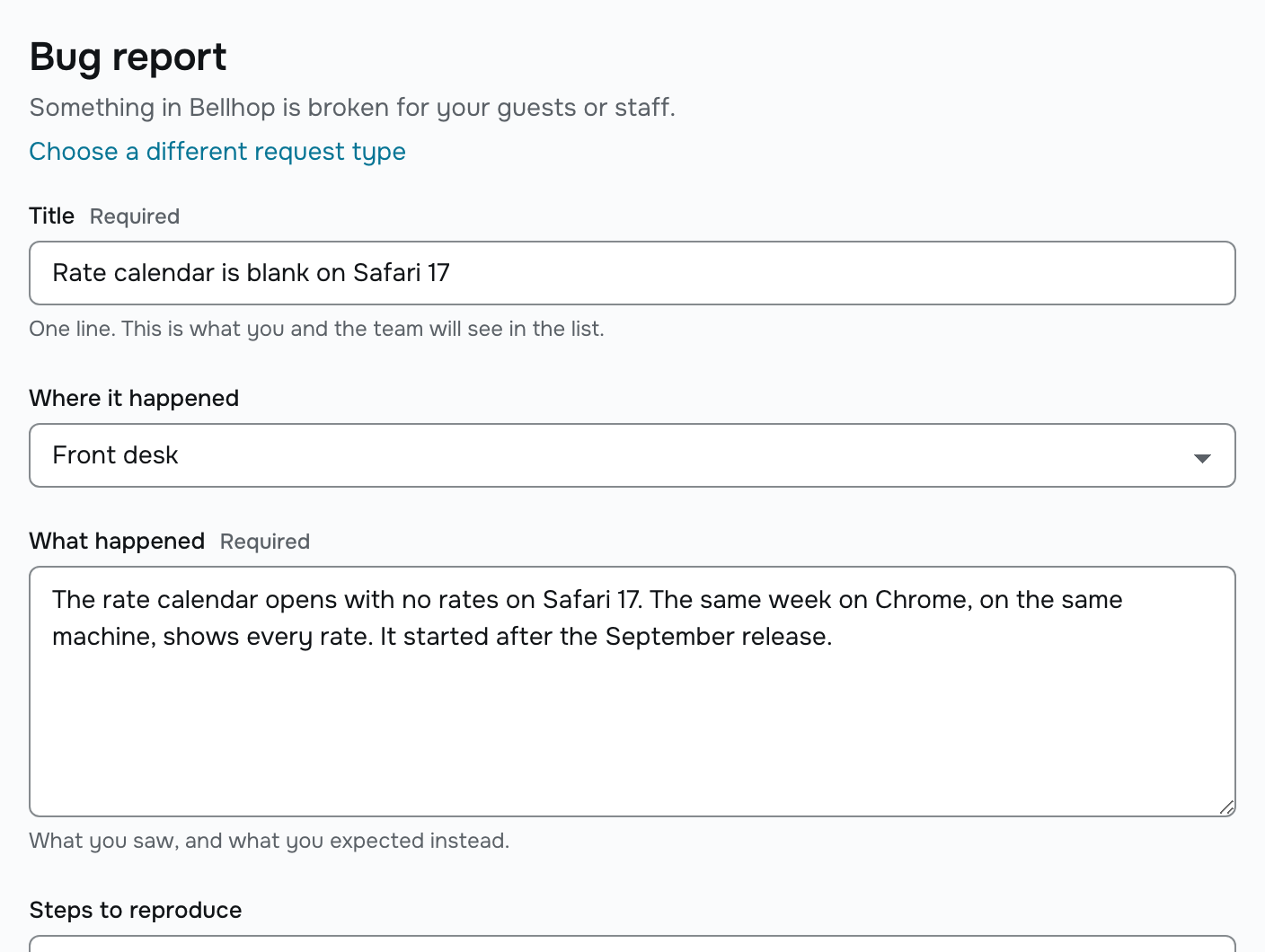
Your portal lives at your-name.pealboard.com. Add request types like Bug report, Feature request or Question. Point each one at a repository, its labels and a project.
Customers send requests. Engineers see issues.
A customer signs in with a code sent to their email, fills in a short form, and gets a request number. The issue appears in GitHub with a line saying who asked. The customer never sees GitHub.
Portals
A front door for everyone who isn’t on GitHub
A portal is a space at your-name.pealboard.com where customers, partners and staff can send requests and watch them move. No GitHub account needed.
- Every request is one GitHub issue, in the repository you chose.
- Customers see a simple status: Open, Planned, In progress, Waiting on you, Completed, Merged or Closed. It updates on its own from GitHub.
- Customers never see GitHub, never see an internal comment, and never see another company’s private requests.
- Sign-in is a 6-digit email code or a link. No passwords.
- Unlimited customers on every plan. They’re never billed.
Simple pricing
You pay per workspace member, per month. Viewers are free. Engineers are never counted. Portal customers are never billed.
Free
$0
Try Pealboard with a few repositories and one portal.
- Up to 3 members
- 1 portal
- Up to 3 repositories
- Unlimited portal customers, never billed
Team
$10 per member per month
For a product or support team working across your whole GitHub organization.
- Unlimited members, billed per seat
- Up to 5 portals
- Unlimited repositories
- Unlimited portal customers, never billed
Business
$20 per member per month
For a company that wants a portal for every customer. Single sign-on and audit log export arrive in v1.1.
- Unlimited members, billed per seat
- Unlimited portals
- Unlimited repositories
- Unlimited portal customers, never billed
Common questions
- Our engineers already work in GitHub. Why add another tool?
- Your engineers don’t have to change a thing. They keep working in GitHub, they never sign into Pealboard, and they never add to your bill. The only thing they’ll notice is a new issue with a line naming the customer who asked for it.
- What happens to our data if we cancel?
- Nothing. Your issues, comments, labels, milestones and project fields were in GitHub the whole time. Pealboard only stores what GitHub can’t: portal customers, request visibility, saved views, notifications and billing. There’s no export to run and no migration to plan.
- We already have a support portal or feedback tool. Why switch?
- Most of those tools keep requests in their own database and link them to GitHub later, if at all. That leaves you with two systems to keep in sync. A Pealboard request is the GitHub issue. Your engineer already has it open.
- Can our customers see our internal engineering discussion?
- No. Customers see what they wrote in the portal and any reply a member chose to send them. Everything else stays internal. There’s a setting that shows customers every GitHub comment, and it’s off by default.
- Do we get single sign-on and an audit log?
- Portal single sign-on (JWT), audit log export and custom portal domains are planned for the Business plan in v1.1. They don’t ship today, and there’s no SAML yet. The pricing page keeps this list current.
- Do we have to migrate our Jira or Linear backlog?
- No. Pealboard reads what’s already in GitHub, so there’s nothing to migrate. If your backlog lives in Jira or Linear instead of GitHub Issues, Pealboard isn’t built for that.
Try it free
Three members, one portal, three repositories. No card needed. Want to try Team? The 14-day trial needs no card either.