



The workspace
See all your GitHub work in one place
Product managers, support staff and business owners can see and sort GitHub Issues and Projects across every repository. No GitHub seat. No Git to learn.
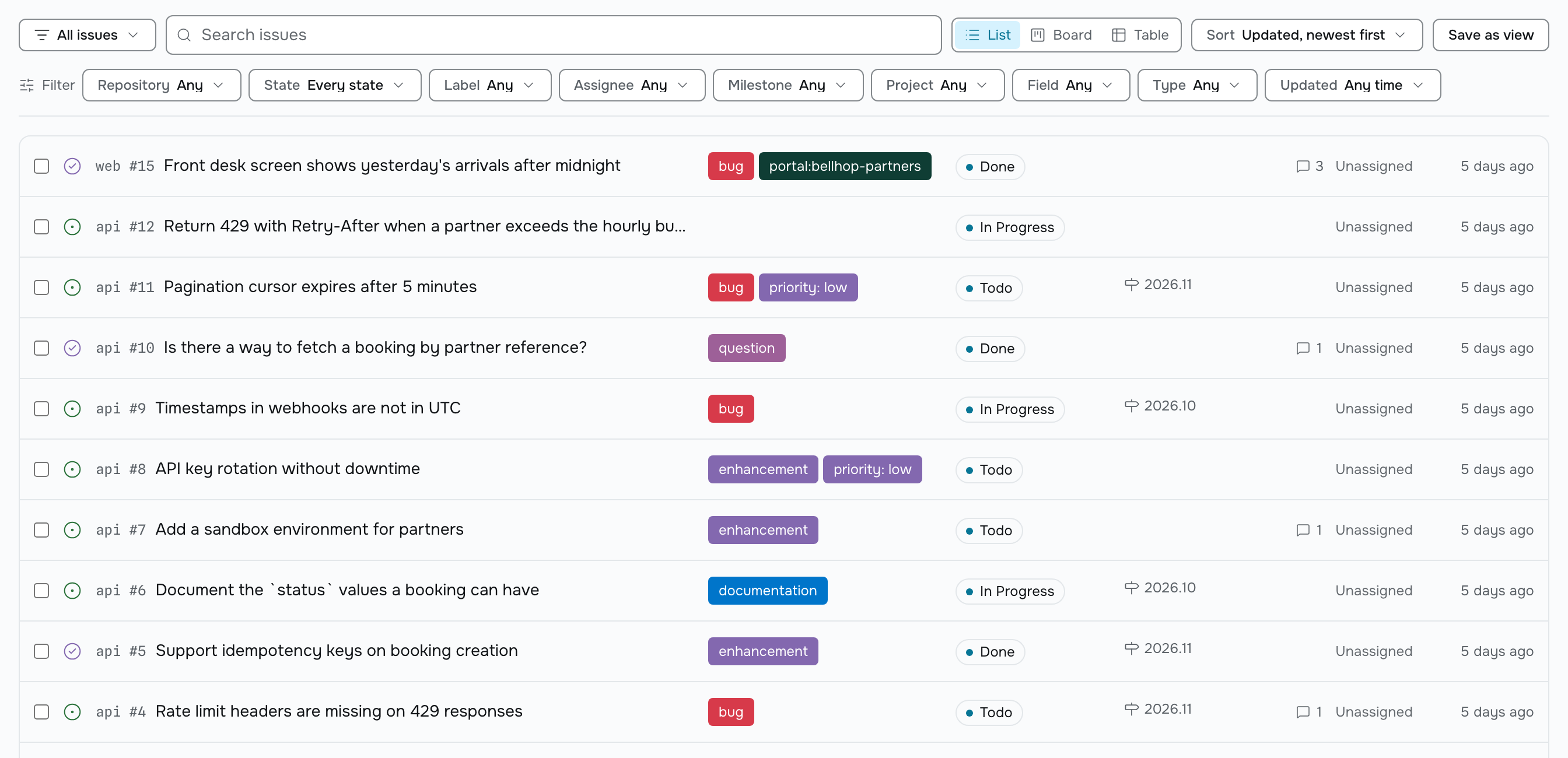
Issues
Every repository, in one list
See every issue across every connected repository, on one screen. Issue numbers and repository names are easy to copy. Labels keep the colors GitHub gave them. The state is always a word and an icon, so nobody has to guess what a color means.
- Three layouts: list, board and table.
- Group your board by a project field, a label group, assignee, milestone or state.
- Drag a card and the field updates in GitHub. If GitHub says no, the card moves back and you see why.
- The table shows project fields as columns. Edit them right there.
Views
Save a search. Share it with a name.
Filter, sort and group, then save the result as a view. A view has a name and a link, so your teammates can open it too. It remembers its layout, so a board opens as a board.
- Filter by repository, state, label, assignee, milestone, project, project field, portal or text.
- Every active filter is a chip. Click it to remove it.
- Share a view with the workspace or keep it to yourself.
- Deleting a view changes nothing about your issues.
Projects and fields
Your GitHub Projects, as they are
Pealboard doesn’t invent its own projects or fields. It uses the GitHub Projects and fields you already have. Single select, number, date and iteration fields all work for filtering, sorting and grouping.
Statusis a project field. Open and closed are states. Pealboard shows both and never mixes them up.- Add a project, field or option in GitHub and it shows up in Pealboard on the next sync.
- Your project’s built-in automations keep running. Pealboard leaves them alone.
Search
Search everything, fast
Search titles, bodies, label names and issue numbers across every connected repository. Results appear as you type. Pealboard searches its own copy, kept current by GitHub webhooks, so it never waits on GitHub or eats into your API limits.
- Matching is by word.
deployfinds "deploying" and "deployment". - Comments aren’t searched. Filter to the issue and open it instead.
- A new issue is searchable within seconds of GitHub accepting it.
Notifications
Know what needs you
Your Inbox collects what matters to you: a new request in a portal you manage, a new public comment, a comment on an issue assigned to you, or a status change on an issue you follow. It’s a tray, not a bell.
- Email on status changes and new public comments. Each member picks their own.
- An optional daily digest of activity in the portals you manage.
- One Slack webhook per workspace for status changes, public comments and new requests. One line per message.
MCP
Twelve tools for your AI assistant
A remote MCP server at mcp.pealboard.com lets an AI assistant work with your issues and requests. It uses the same API key as everything else, and each tool matches the API exactly.
search_issues,get_issue. Read across every connected repository.create_issue,comment_on_issue,update_issue. Write to GitHub with the same permissions as the API.move_issue. Set a project field value.list_projects,list_views,run_view. Run a saved view.list_portals,list_portal_requests,reply_to_portal_request. Read and answer customers.
API
A clean REST API, fully documented
One API for your workspace and one for your portals, both published as OpenAPI 3.1 from the same schemas the server checks against. API keys start with `pb_`, are stored as digests, and are shown once.
- A request id on every response, so support can find it.
- One error format everywhere.
- Cursor pagination, ETags on reads,
Idempotency-Keyon creates. - A key can never do more than the member who created it.
Mobile
Take it with you on iOS and Android
Check your inbox, browse and filter issues, read and reply to comments, change a status, and answer portal requests from your phone. Push notifications cover the same events as your Inbox.
- Same account, same workspaces as the web app.
- Included with every plan. Nothing extra to buy.
What Pealboard leaves to GitHub
Pealboard keeps GitHub as the one place your work lives. So a few things stay out on purpose.
No custom workflow engine
Your board is a layout over your GitHub Project’s own Status field. GitHub doesn’t let other tools write project workflows, so any workflow engine would mean a second copy of your work.
No estimates or velocity charts
GitHub’s Insights charts live only in GitHub’s own interface. Pealboard keeps the current value of each issue, not a history to chart.
No time tracking
GitHub doesn’t store it, so Pealboard doesn’t either.
No help desk
No SLA timers, no separate queue, no satisfaction surveys, no multi-channel inbox. A portal request is always one GitHub issue.
Connect a repository and take a look
The Free plan connects three repositories with no card. Nothing is imported and nothing in GitHub changes.